2026-08-23 · 7 min read
Gym Journal vs Spreadsheet: Which Should You Use to Track Workouts?
A lot of self-directed lifters start the same way: a Google Sheet with columns for exercise, weight, reps, and date. It costs nothing, it's infinitely customizable, and nobody's onboarding quiz gets in the way of you just typing in what you did. For a while, that's genuinely enough.
The question isn't whether a spreadsheet can track a workout — it obviously can. The question is what it stops being able to do as your training history grows, and whether that gap is worth the switch to something built specifically for this. Here's an honest comparison, not a sales pitch for abandoning spreadsheets entirely.
The short version
- A spreadsheet is free, fully flexible, and requires no app — you can start one in five minutes with columns you design yourself.
- It has no memory. Every lookup — "what did I do last time on this exercise" — is a manual scroll or a formula you have to build and maintain yourself.
- PRs, volume trends, and recovery patterns don't surface on their own. You either build charts by hand or you don't see them at all.
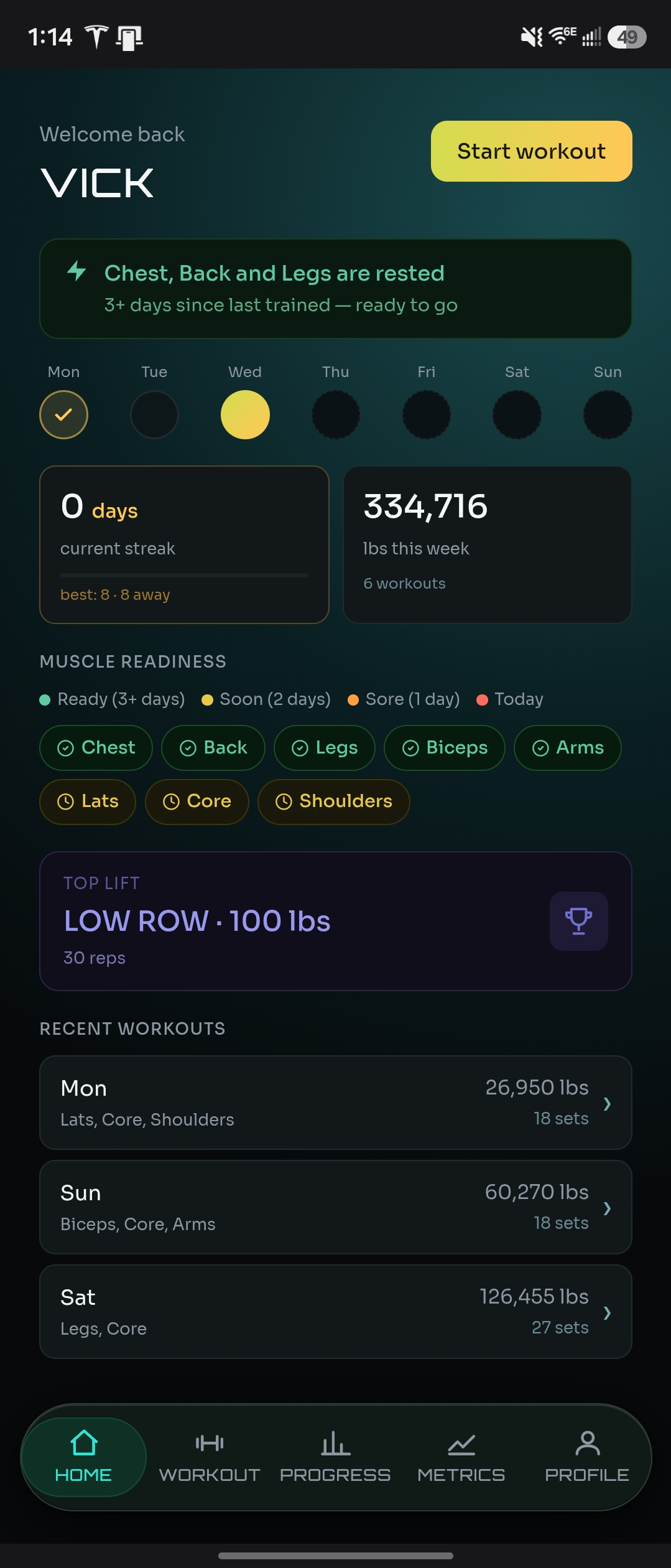
- A dedicated gym journal like NaMiVisa does the same logging job but surfaces last-session data, PRs, and volume trends automatically — no formulas, no manual charting.
- The honest tradeoff: a spreadsheet wins on raw flexibility and offline access. A purpose-built journal wins on speed once your history gets past a few months.
What spreadsheets actually get right
It's worth saying plainly: a spreadsheet is a perfectly rational way to start. There's no signup, no app to trust with your data, and no assumptions baked in about how you should train. You control the columns, the formatting, the tabs — if you want a column for bar path notes or a tab per training block, you build it yourself. For a lifter who's comfortable with Excel or Sheets, that flexibility is real, and it's the reason spreadsheets are still the default starting point for a lot of people.
Spreadsheets are also genuinely offline-capable and export-friendly. Your data lives in a file you own, in a format every other tool can read. If you want to hand your training log to a coach, dump it into another analysis tool, or just keep a permanent local backup, a spreadsheet does that without any extra work.
Where the cracks show up
The problems don't show up on day one. They show up around month three, once your sheet has a few hundred rows and you're trying to actually use the data instead of just adding to it. The core issue is that a spreadsheet has no memory of its own — it's a table, not a system. It doesn't know what "last session" means for a given exercise. You do, and you have to go find it: sort, filter, or scroll to the last row where that exercise appears, every single time you want to check what you lifted before loading the bar.
That lookup is exactly the step that drives progressive overload — checking your last numbers before you decide whether to match, beat, or back off. When it takes ten seconds of scrolling instead of being immediately visible, most lifters skip it. Not from laziness — it's genuinely more friction mid-workout than the format can absorb, and the app's job is to remove exactly that friction.
PRs, volume, and trends: manual work vs. automatic
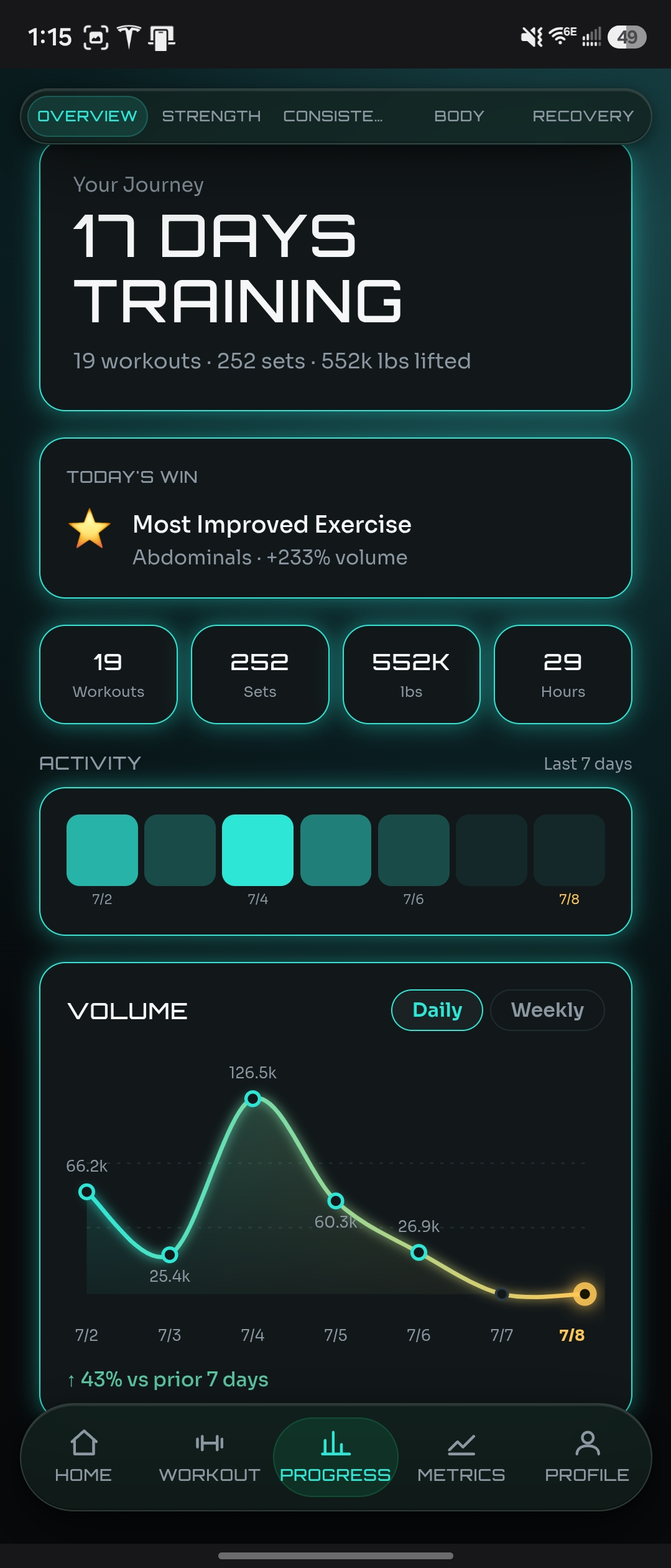
Personal records in a spreadsheet exist only if you notice them and write them down separately, or if you build a formula to compute a max per exercise and keep it updated as new rows get added. Volume trends — sets × reps × weight, tracked over weeks — require a pivot table or a chart you set up once and then remember to keep pointed at the right range as your data grows. None of this is hard for someone who knows spreadsheets well. But it's ongoing maintenance, and it's maintenance that competes with actually training.
A dedicated gym journal treats this as the whole point of the product rather than an advanced feature you build yourself. Every set you log is tied to that exercise's full history automatically, so "last time" is just there when you go to log a new one. PRs get captured the moment they happen, with no formula to maintain. Weekly volume is charted without you touching a pivot table. The underlying data is the same either way — the difference is entirely in what surfaces without extra work.
Logging speed, mid-workout
On a phone, between sets, a spreadsheet app is not built for fast data entry. Tapping into the right cell, in the right row, without fat-fingering an adjacent one, is slower and more error-prone than a purpose-built logging screen with exercise search and numeric input designed for exactly this moment. This is a small friction per set, but it adds up across a session, and it's the kind of friction that makes people log less accurately — rounding numbers, skipping a set's entry, or just logging after the fact from memory.
This is less of a problem on a laptop after the fact, but most training happens with a phone in hand, not a laptop. If you're logging in the gym, in real time, this is where a dedicated app's advantage is most obvious.
Recovery and body metrics: usually just missing
Most workout spreadsheets track lifts and nothing else. Sleep, energy, stress, body weight, body fat — these either live in a separate sheet nobody cross-references, or don't get tracked at all. That's a real gap, because a stalled lift often has more to do with recovery than with the exercise itself, and you can't see that connection if the two data sets never sit next to each other.
A journal built around training already has a natural place for this — recovery signals and body metrics logged in the same app, next to the lifts they explain. You don't need a second spreadsheet and a habit of remembering to update it; it's just there.
When a spreadsheet is still the right call
If you're logging a handful of exercises a week, you're comfortable with formulas, and you actually keep up with the charts you built, a spreadsheet can keep working indefinitely — some lifters genuinely prefer owning the raw file over trusting an app. The switch is worth making when the manual lookup starts getting skipped, when PRs stop getting noticed until weeks later, or when you realize you haven't opened the volume chart tab in a month because updating it became its own chore.
How NaMiVisa handles this
NaMiVisa is built to remove exactly the maintenance a spreadsheet asks you to do yourself. Every exercise you log carries its own history forward automatically, so the last-session lookup that drives progressive overload happens without a search. PRs are detected and recorded the moment they happen. Weekly volume, training consistency, body metrics, and recovery signals — sleep, energy, stress, motivation — are all tracked and charted in the same place, so a stalled lift and a bad sleep week are visible side by side instead of living in two files you never compare.
It's still just logging — exercise, sets, reps, weight, or duration. The difference is what happens to that data after you enter it.
See also
Try the live demo — no sign-up required
Explore months of realistic training data before creating an account.
Bottom line
A spreadsheet is a legitimate way to track workouts, and it's free forever with total control over the format. Where it falls short isn't the logging itself — it's everything that's supposed to happen after: the last-session lookup, the PR you didn't notice, the volume trend you never charted. A dedicated gym journal doesn't log anything a spreadsheet can't; it just does the follow-through automatically instead of leaving it as homework.
There is a live demo account with months of realistic training data you can explore before creating an account — no email required.
NaMiVisa is a free private workout tracker. Learn more →