2026-08-30 · 7 min read
NaMiVisa vs MyFitnessPal: Which One Should You Use to Track Your Training?
MyFitnessPal is one of the most downloaded fitness apps in the world, but it didn't earn that reputation from workout tracking — it earned it from food logging. The barcode scanner, the enormous food database, the macro targets: that's the product. Exercise logging exists inside the app too, but it was built as a companion to the calorie count, not as its own feature.
NaMiVisa is built the other way around. There's no food database, no calorie count, no macro target — it's a dedicated journal for the training itself: sets, reps, weight, PRs, volume, recovery. Comparing the two isn't really an apples-to-apples workout-tracker comparison, and that's worth being upfront about. Here's an honest look at what each one is actually for, and where the overlap is thinner than it looks.
The short version
- MyFitnessPal's core product is nutrition tracking — food database, barcode scanning, macro targets. Exercise logging is a secondary feature bolted onto that.
- Premium runs $19.99/month or $79.99/year; Premium+ is $24.99/month or $99.99/year and adds a meal planner. Both are priced around nutrition features, not training ones.
- MyFitnessPal's own community regularly flags the exercise database as tedious and incomplete for strength training — missing common lifts, and no practical way to log ten-plus exercises in a session.
- There's no automatic PR detection, no volume trend chart, and no per-exercise 'what did I lift last time' history — the exercise log is closer to a calorie-burn estimator than a training journal.
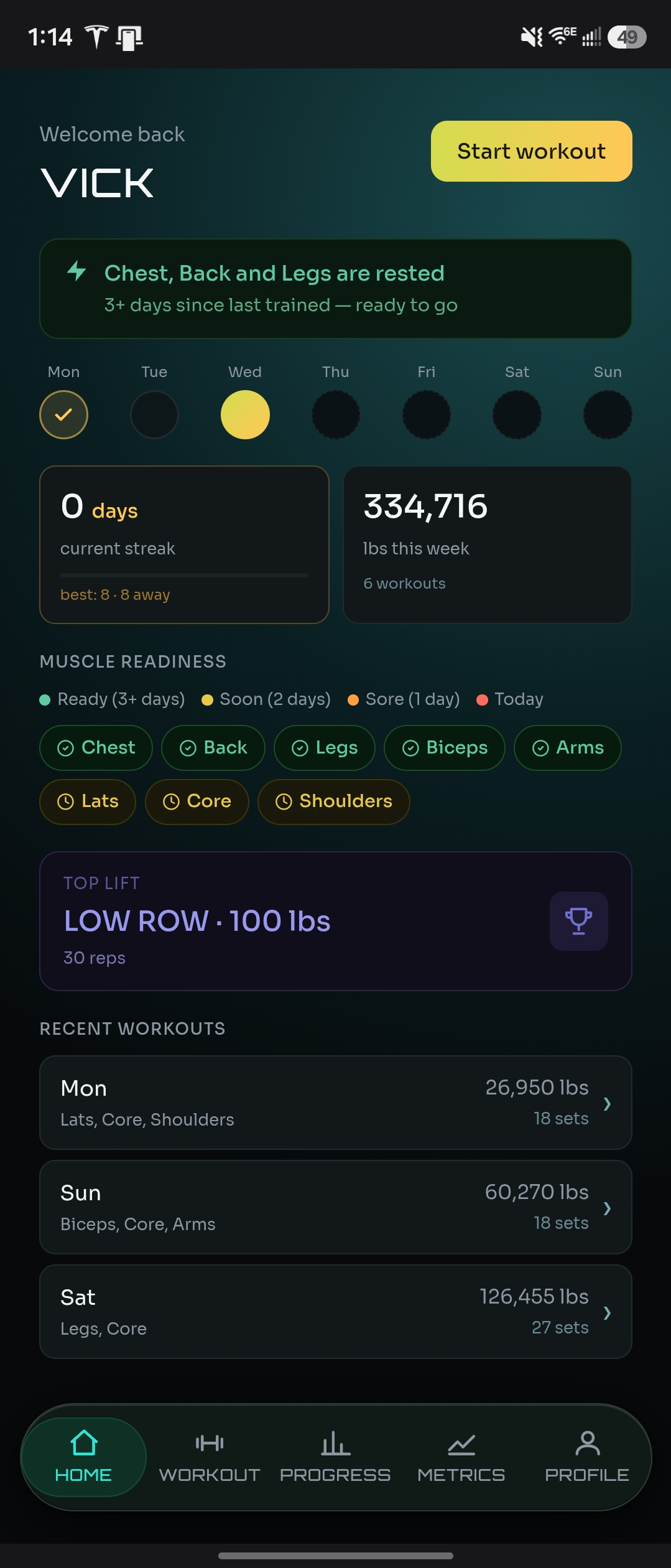
- NaMiVisa doesn't track food at all. It's built entirely around workout logging, PRs, volume, body metrics, and recovery — free indefinitely.
What MyFitnessPal actually does well
It's worth saying plainly: MyFitnessPal earned its size honestly. The food database is enormous, barcode scanning works well, and logging a meal takes seconds once you've used it a few times. Premium adds voice logging, photo meal scans, custom macro targets in grams, different targets for different days, and fasting tracking. For anyone whose primary goal is managing calorie intake or body weight through diet, this is a genuinely mature, well-built tool.
If tracking what you eat matters as much to you as tracking what you lift, that's simply not something NaMiVisa does or is trying to do. MyFitnessPal's nutrition side is the real product, and it's a strong one.
Where the exercise logging falls short
The exercise side of the app tells a different story. Weight, reps, and duration can technically be logged per exercise, but the database has real gaps — commonly cited complaints from MyFitnessPal's own user community describe missing exercises for basic movements, a search function that only really works if you know the exact name to type, and no realistic way to log ten or more exercises from a session without it becoming its own chore. The whole log is oriented around estimating a calorie burn for the entry, not around recording a working set the way a strength log would.
That framing matters more than it sounds. A workout tracker built for strength training treats "what did I lift last time on this exercise" as the central question it answers automatically. MyFitnessPal's exercise log doesn't do that — there's no per-exercise history view, no automatic PR detection, and no volume trend chart. You can technically write the numbers down, but nothing is done with them afterward.
Pricing: what the subscription actually upgrades
MyFitnessPal Premium costs $19.99/month or $79.99/year, and Premium+ runs $24.99/month or $99.99/year on top of that for a meal planner with recipes and grocery sync. A 7-day free trial is available for new users. Every one of those upgrades is a nutrition feature — barcode scanning refinements, macro customization, meal planning. None of it touches the exercise log. Paying for Premium removes ads and unlocks food-tracking depth; it does not add PR tracking, volume charts, or a better strength-training experience.
NaMiVisa's full feature set — workout logging, PRs, progress charts, body metrics, recovery tracking — is free indefinitely, with no ads and no trial clock. There's nothing to upgrade to for the training side, because there's no gated tier holding any of it back.
Progress tracking and PRs
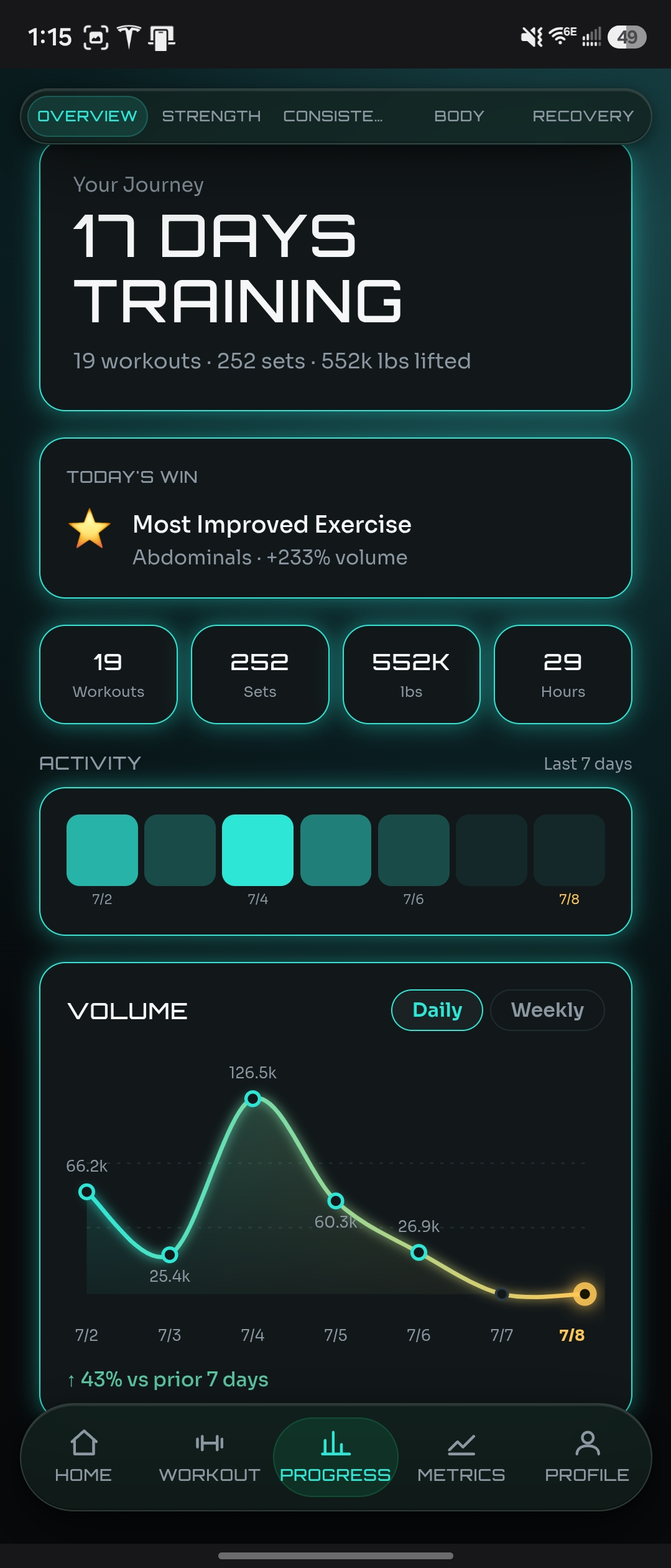
MyFitnessPal can show you an estimated calorie burn for a logged exercise and a basic history of entries, but it isn't built to answer "am I progressing on this lift." There's no automatic personal-record detection and no weekly volume trend — the kind of view that tells you whether your training is actually moving, independent of any single session's numbers.
NaMiVisa treats this as the core job. Every set you log ties into that exercise's full history, so the last-session lookup is immediate. PRs are captured automatically the moment they happen. Weekly volume is charted without any manual setup — the difference is entirely in what the app does with the numbers after you enter them.
Body metrics and recovery
MyFitnessPal tracks body weight, tied closely to its calorie-goal math — it's there to tell you whether your intake is on track for a weight target, not to give you a broader picture of body composition or training readiness. There's no sleep, energy, stress, or motivation tracking anywhere in the app; recovery simply isn't part of what it's built to measure.
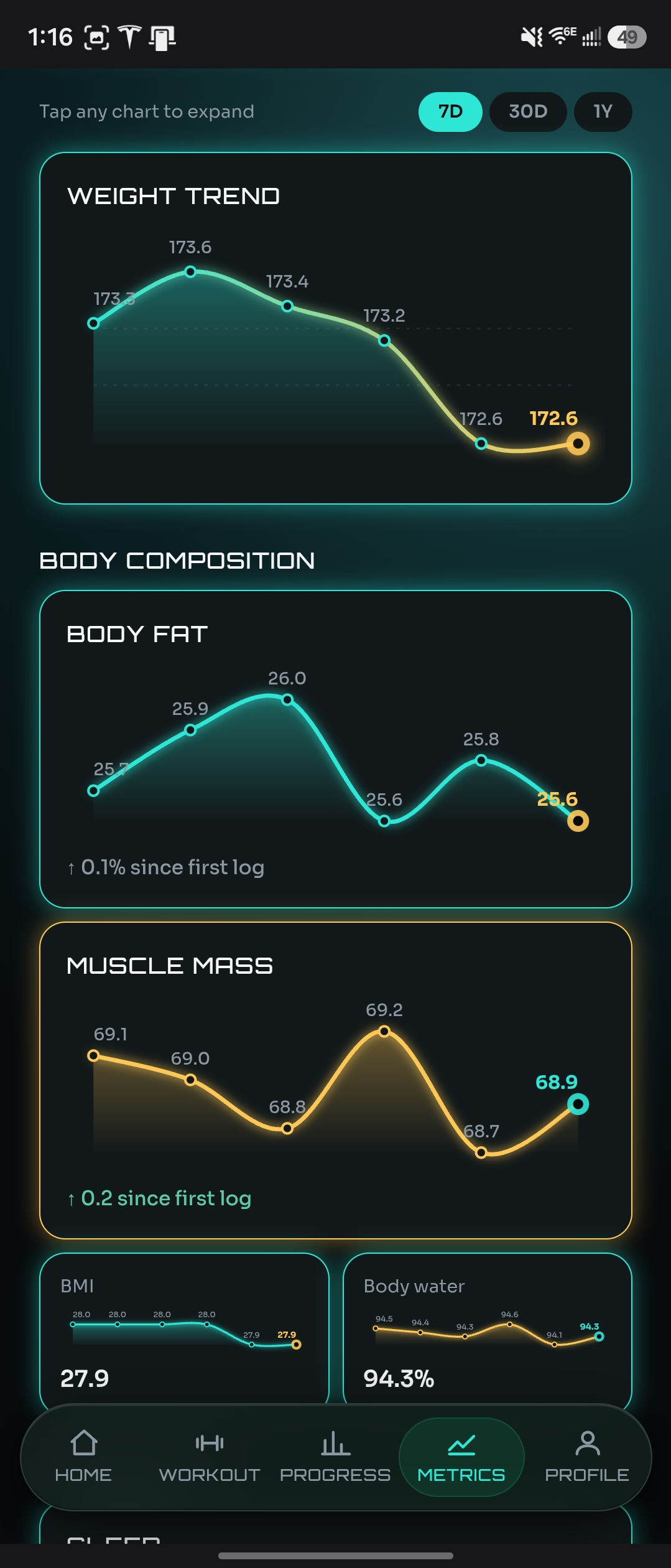
NaMiVisa logs body metrics — weight, body fat percentage, muscle mass, BMI — alongside recovery signals like sleep quality, energy, stress, and motivation, all charted next to the training data they explain. A stalled lift and a bad sleep week show up side by side instead of living in separate apps that never talk to each other.
Can you reasonably use both?
Genuinely, yes — and this is less of a competitive comparison than the others on this site for exactly that reason. If calorie and macro tracking matters to you, MyFitnessPal does that job well, and NaMiVisa isn't trying to replace it. Plenty of lifters log food in one app and training in another because the two apps aren't actually trying to do the same thing. The overlap is really just the exercise log, and that's the part MyFitnessPal treats as secondary.
Who should use MyFitnessPal
- Calorie counting and macro tracking are your primary goal, not strength progress
- You want an enormous, well-maintained food database with fast barcode scanning
- You're managing a weight target and want your nutrition and body weight tracked together
- Detailed exercise history — PRs, volume trends, per-exercise progress — isn't something you need from this particular app
Who should use NaMiVisa
- Strength training is the thing you actually want tracked — sets, reps, weight, and how they change over time
- You want PRs and volume trends surfaced automatically, not a calorie-burn estimate on a logged entry
- You want recovery — sleep, energy, stress — tracked alongside your training, not left out entirely
- You don't need food logging in the same app, or you're happy to keep that in MyFitnessPal and use NaMiVisa purely for training
See also
Try the live demo — no sign-up required
Explore months of realistic training data before creating an account.
Bottom line
MyFitnessPal is a strong choice if calorie and macro tracking is what you actually need, with exercise logging along for the ride rather than as the main event. NaMiVisa is the better fit if strength training is the thing you want tracked properly — PRs, volume, and recovery, surfaced automatically instead of left as a manual afterthought. They're not really competing for the same job, and for a lot of lifters, that means there's no reason to pick just one.
There is a live demo account with months of realistic training data you can explore before creating an account — no email required.
NaMiVisa is a free private workout tracker. Learn more →